Urbana app: parking, bus fares and P+R in Ljubljana
The Urbana app from LPP, Ljubljana's public transport company, turns your phone into a virtual city card: pay for street parking and garages, pay for Park & Ride, buy bus tickets and open car park barriers. Free for Android 6.0+ and iOS 13.0+, with an English interface.
An unofficial guide focused on parking. Button names in the English version of the app may differ slightly. Official, up-to-date instructions are published by LPP.
Paying for street parking (Upark)
Upark is for paying for parking in the street parking zones run by LPT.
- 1Open the app and choose the Upark tab on the home screen.
- 2Check that your location matches the parking zone the app has detected.
- 3Tap Park.
- 4Enter your number plate and choose a payment method.
- 5Set the parking time on the circular slider and tap Start parking.
Car parks and garages with barriers
In car parks with a barrier there are three options, depending on the equipment. Contactless payment works up to about 1.5 metres from the terminal.
Entering and leaving through the barrier
Entry
- 1Open the app in front of the entry barrier.
- 2Tap Use Urbana.
- 3Choose Entry.
- 4When the transaction succeeds, the barrier opens.
Exit
- 1Open the app in front of the exit barrier.
- 2Tap Use Urbana.
- 3Choose Exit.
- 4The payment is taken and the barrier opens.
Paying at a parking meter
- 1On the parking meter, press Plačilo z Urbano (pay with Urbana). Repeat this step for each hour.
- 2Press the green button and wait until the blue light on the terminal flashes.
- 3In the app, tap Use Urbana and choose Parking meter.
- 4When the terminal beeps, the app shows a purchase confirmation.
- 5The meter prints a ticket. Put it where it can be seen behind the windscreen.
Paying at a pay station in a garage
- 1Take a parking ticket at the barrier when you drive in.
- 2Before leaving, insert the ticket into the pay station and choose to pay with Urbana.
- 3Open the app, tap Use Urbana and choose Pay station.
- 4Once the payment succeeds, take the paid ticket and use it to open the exit barrier.
Park & Ride (P+R) car parks
To pay for Park & Ride you must be physically inside the car park. The payment covers 24 hours of parking and two single bus rides.
How it works
- 1Choose a P+R point on the map, or tap the P+R button and pick the car park from the list.
- 2Tap Park and choose P+R parking.
- 3Enter your number plate and choose a payment method.
- 4Tap Pay for parking.
P+R Stožice (with barrier)
At the entrance, press the button on the terminal and take a ticket; the barrier opens. Once parked, pay in the app. On the way out, tap Use Urbana and the barrier opens automatically. You can throw away the entry ticket.
P+R Studenec (multi-storey car park)
The GPS signal is weak inside the building, so pay for P+R at the entrance before you drive in.
Long-stay parking, camper vans and coaches
- 1Open the P+R tab and choose the car park.
- 2Choose long-stay parking, camper van parking or coach parking from the list.
- 3Enter your number plate, choose a payment method, set the time and confirm.
Paying for LPP buses
To pay on the bus, Bluetooth and mobile data must be on; on Android 11 or older, location must be on too. Validate between 20 cm and 1.5 metres from the card reader.
City bus: When you are near the card reader, tap Use Urbana. The app connects via Bluetooth and confirms that validation was successful.
Suburban bus: The same, but after connecting you choose your exit stop and confirm.
Several people: On the home screen, tap the plus next to Use Urbana, choose the number of people and zones, and confirm. Transfers are free within 90 minutes; do not validate again when you change buses.
Monthly and annual passes
- 1In the menu, choose Products and services.
- 2Choose Monthly or Annual 12.
- 3For an annual pass, also choose the start date.
- 4Choose a payment method and tap Buy ticket.
You can buy period passes for the general and primary-school statuses. LPP passes for pupils, students, intercity travel and pensioners cannot be bought or transferred in the app.
Topping up and payment methods
Before each use, check that you have enough credit in your account. The maximum balance is €50.
Mastercard / Visa
Credit or debit card
Valú
Mobile wallet
Aircash
Mobile wallet
Sales points
Kiosks, petrol stations, shops (not Urbana machines)
Adding a payment card
In the menu, choose Payment methods → Payment card and tap Continue. Enter the cardholder details. A €0 transaction is made to verify the card; once confirmed, the card is added. To add credit, tap Top up.
Adding a Valú or Aircash wallet
In the menu, choose Payment methods and then the wallet. Enter your mobile number and confirm with the code sent by text message.
Topping up at a sales point
Tell the cashier the amount, open the menu with the red Urbana icon and enlarge the QR code. The cashier scans the code and adds the credit.
All services
The Urbana app covers services from several operators. Besides payments, it is also a handy information tool.
| Service | What it does | Operator |
|---|---|---|
| Urbana SMS parking | Pay for street parking via the SMS parking system | JP LPT |
| Funicular | Pay for the ride up to Ljubljana Castle | Ljubljana Castle |
| BicikeLJ | City bike hire; needs a separate link via a 12-digit code | Europlakat |
| Ljubljana Tourist Card | Buy and use the digital card for sights and attractions, available in several languages | Visit Ljubljana |
| Ljubljana City Library | Membership ID via QR code | MKL |
| LPP buses | Pay fares on city and suburban buses, for several people and zones; free transfers within 90 minutes | LPP |
| Street parking (Upark) | Pay for parking in the zones, extend your time and get a reminder before it runs out | JP LPT |
| Garages and car parks with barriers | Open barriers and pay at a parking meter or pay station | JP LPT |
| P+R | Pay for Park & Ride, long-stay parking, and parking for camper vans and coaches | JP LPT |
Besides payments, the app also offers:
- A map of bus stops, Urbana machines, car parks, garages, BicikeLJ stations and library branches.
- Real-time bus arrivals and journey planning.
- Your account balance and a history of rides, parking and top-ups.
- Account top-ups and an English interface.
Moving a physical Urbana card to the app
You can move one personal card with the general or primary-school status. Anonymous stored-value cards cannot be moved. After the transfer, the physical card stops working.
- 1In the menu, tap Transfer Urbana card to the app.
- 2Tap Scan code.
- 3Hold the physical card against the back of your phone (NFC antenna). If it cannot be read, enter the number manually.
- 4Check the card details and continue.
- 5Enter the first name, surname and date of birth shown on the card.
- 6If the details match, the card is transferred.
Moving credit from an old account: If you sign in to the new account with the same email address, the app offers the transfer automatically. With a different email address, write to [email protected] with the IDs of your old and new mobile Urbana.
Frequently asked questions
Can Urbana open the barrier in a car park?
How do I pay for street parking with Urbana?
Why doesn't Park & Ride payment work?
How much credit can I keep in my account?
How do I top up my Urbana account?
How close to the reader do I need to be on the bus?
Can I transfer a student pass to the app?
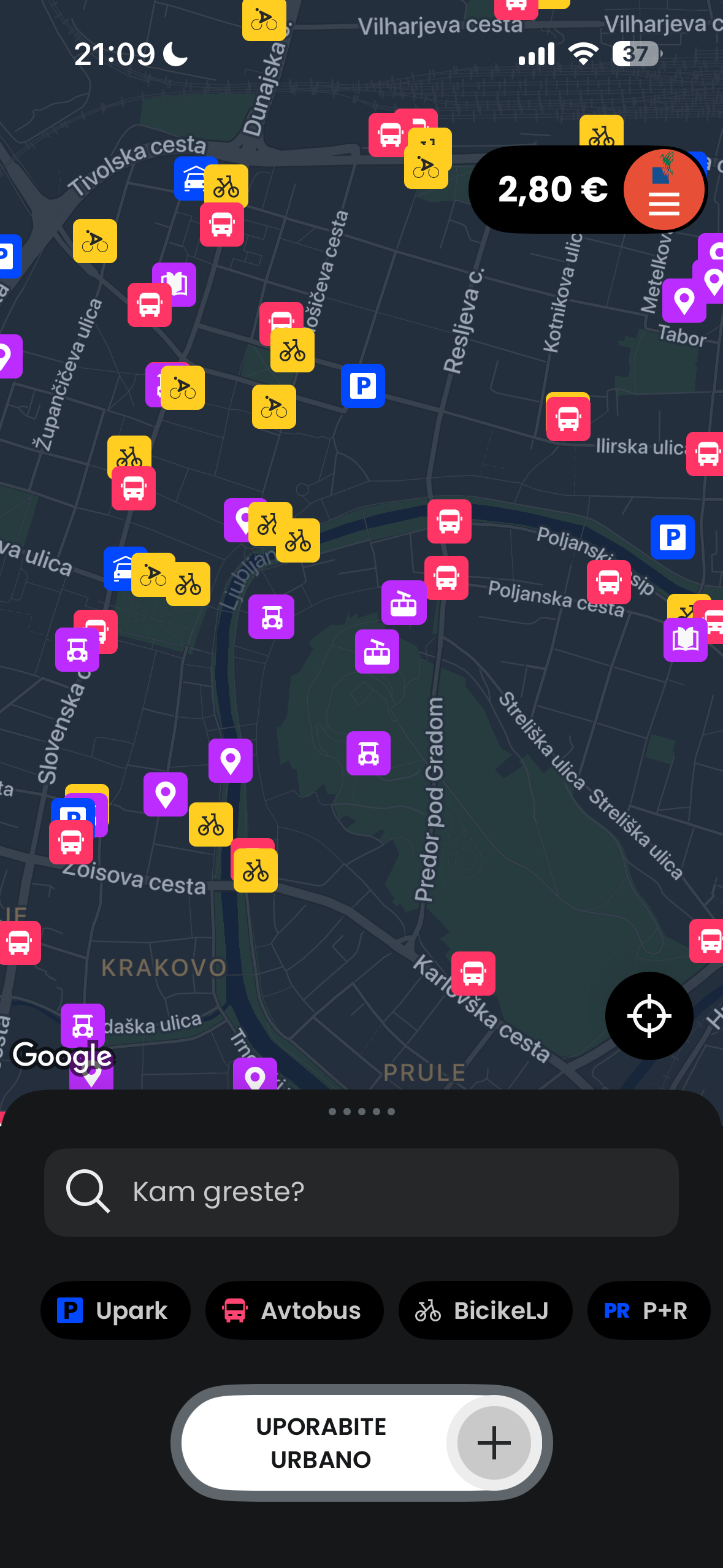
What is Urbana?
The official app of LPP d.o.o. combines parking, Park & Ride, buses, the castle funicular and the tourist card. Free for Android and iOS.
- Street parking (Upark)
- Car parks and garages with barriers
- Park & Ride car parks
- LPP city and suburban buses
- Ljubljana Castle funicular
- Ljubljana Tourist Card
Requirements
- Android 6.0+ or iOS 13.0+
- Mobile data for all services
- Bluetooth for buses and barriers
- Location services (Android 11 or older, buses only)
Download the app
Help and official source
For questions and complaints, contact LPP.